Shared by

Rating
Author Notes
I hope that you are liking the fvwm config. Despite my initial expectation of about 30 downloads, it currently has over 1000. Thank you all. The next release will contain fixes, more themes and modules, so stay tuned.

At the moment I’m working on more advanced modules. FvwmButtons should honestly be rewritten as a standalone program. Then the widgets could be used on any wm.
Modules (clockwise from top left)
system-plot: shows CPU and memory usage as graphs
lcd-clock: will have color variations. It can also have a plain or striped background.
sunmap (“mir" style)
pager
(I’ll fix the colors and spacing for the final release).
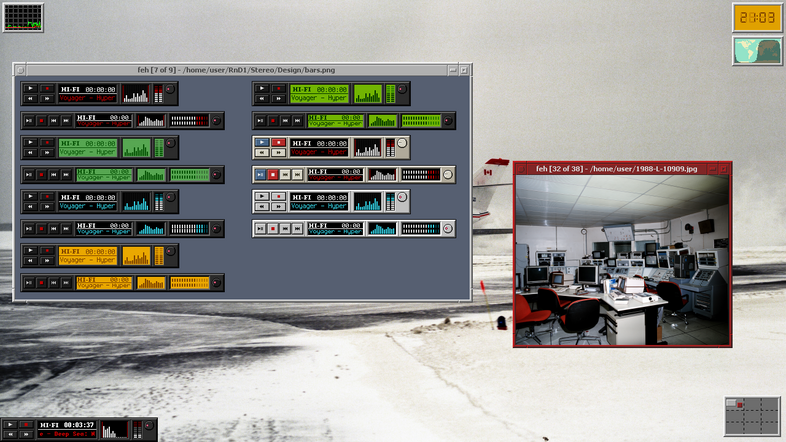
media-bar
It shows the song title as scrolling text and the remaining time. When you pause the song, it stops scrolling. Currently this uses mpd + mpc, but I’m thinking of making a playerctl variant that can be used with any media player (even videos).
The volume can be changed by scrolling over the volume dial. It also updates immediately if you have the volume-event module loaded. I also have a variant using xevent for click + drag functionality, but it seems better to not overcomplicated this.
These media-bar designs aren’t final and the small variant looks a bit different in the current implementation. But this image shows the original idea.
Bugs in 1.0 release
I noticed that the sunclock module updates incorrectly if you change the map. This can be circumvented by fully exiting fvwm and starting it again. The problem is that fvwm doesn't unschedule updates on restart, so it should be scheduled with an ID and unscheduled beforehand.
Also, Colorset 13 in utils is set to #ff00ff, but should be #000000.
At the moment I’m working on more advanced modules. FvwmButtons should honestly be rewritten as a standalone program. Then the widgets could be used on any wm.
Modules (clockwise from top left)
system-plot: shows CPU and memory usage as graphs
lcd-clock: will have color variations. It can also have a plain or striped background.
sunmap (“mir" style)
pager
(I’ll fix the colors and spacing for the final release).
media-bar
It shows the song title as scrolling text and the remaining time. When you pause the song, it stops scrolling. Currently this uses mpd + mpc, but I’m thinking of making a playerctl variant that can be used with any media player (even videos).
The volume can be changed by scrolling over the volume dial. It also updates immediately if you have the volume-event module loaded. I also have a variant using xevent for click + drag functionality, but it seems better to not overcomplicated this.
These media-bar designs aren’t final and the small variant looks a bit different in the current implementation. But this image shows the original idea.
Bugs in 1.0 release
I noticed that the sunclock module updates incorrectly if you change the map. This can be circumvented by fully exiting fvwm and starting it again. The problem is that fvwm doesn't unschedule updates on restart, so it should be scheduled with an ID and unscheduled beforehand.
Also, Colorset 13 in utils is set to #ff00ff, but should be #000000.
Comments (0)
No comments yet.
Log in to comment.